Performance Max (PMax) is often sold as a “set it and forget it” solution.
In reality, most advertisers lose money with PMax not because the algorithm is bad — but because they launch it without controlling where their ads appear.
If you’re running Performance Max for lead generation (dental, medical, legal, local services, or high-ticket offers), content quality matters just as much as bidding strategy.
Before blaming bidding, assets, or Google itself, audit your Content Suitability settings. These account-level controls are one of the few direct ways to influence placement quality in PMax and they often deliver the quickest wins.
Why PMax Defaults to Wasted Spend in Lead Gen
Out of the box, PMax pulls inventory from:
- YouTube (videos, Shorts, channels)
- Display Network (websites, partner sites)
- Discovery feeds
- Gmail
- Mobile apps (games, casual, lifestyle)
- Search Partners
Google’s AI loves cheap, high-volume placements think gaming apps, kids’ content, meme channels, food blogs, or event apps. These deliver fast impressions and low-cost clicks, inflating metrics while tanking lead quality.
Common symptoms advertisers report:
- CPA looks “good” at first but leads are 60–80% unqualified (wrong intent, fake submissions, no-show appointments).
- Sales teams complain about “junk leads” eating follow-up time.
- High impression volume but conversion rates under 1–2% on forms/calls.
- Budget exhaustion on mobile apps (often 30–50%+ of spend in unchecked accounts).
This isn’t a Smart Bidding issue, it’s a placement hygiene issue.
What Content Suitability Really Controls (and Why It Matters for PMax)
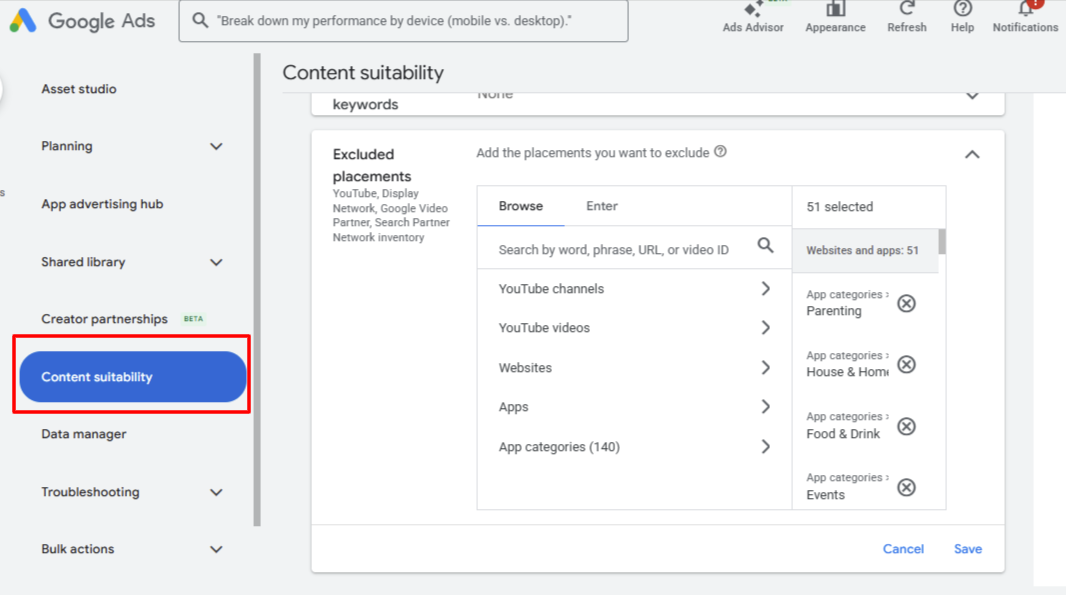
Content Suitability (under Tools & Settings > Shared library > Content suitability) applies account-wide, including to all PMax campaigns. It lets you:
- Block entire app categories or specific apps.
- Exclude specific YouTube channels/videos.
- Restrict websites/apps with low relevance or brand risk.
- Set inventory filters (Standard/Limited/Expanded).
It’s not perfect exclusions don’t cover everything (e.g., limited impact on some Shorts or auto-generated content), and overdoing them can shrink the AI’s optimization pool. But when used smartly, it shifts budget toward higher-intent environments like relevant YouTube videos or quality Display sites.
Step 1: Aggressively Exclude Mobile App Categories
Mobile apps are the #1 culprit for wasted spend in lead-gen PMax accidental clicks from games/entertainment, bot traffic, zero purchase intent.
Real advertiser feedback (from audits and forums):
- Many see 30–50%+ of early PMax spend in apps.
- Excluding categories like Games, Entertainment, Parenting, Food & Drink, Events, Lifestyle can drop ineffective impressions by 70–90%.
- Reported CPA reductions: 15–40% in lead-gen accounts (e.g., local services seeing better form quality after blocking casual apps).
How to do it:
- Go to Content Suitability > App categories.
- Exclude broadly at first: Parenting, Food & Drink, Games (all sub-types), Entertainment, Events, House & Home, Lifestyle. (Start with 100–140 categories if your niche doesn’t overlap.)
- Save and monitor Placement reports for residual apps — add specifics manually.
Tip: Don’t exclude all apps if your offer is app-related; test in phases.
Step 2: Hunt and Exclude Irrelevant YouTube Channels
PMax hides most placement details, but Content Suitability reveals YouTube channels/videos where ads ran.
Common low-performers:
- Kids/family channels (brand risk for adult services).
- Meme, prank, entertainment-only, or low-engagement channels.
- Foreign-language or off-topic content (e.g., immigration/entertainment channels if unrelated).
Process:
- Check Content Suitability > Excluded placements or run a Placement report (Reports > Predefined > Content suitability/Placements).
- Look for channels with high impressions/low conversions (e.g., “La Hora Del Inmigrante,” “LET the FUN,” casual meme channels).
- Add to exclusions (up to 65,000 allowed). Review weekly — new ones appear as the AI explores.
Step 3: Target Low-Quality Websites & Refine Inventory Type
PMax hits Made-for-Ads (MFA) sites, arbitrage pages, and irrelevant partners.
Actions:
- Use Placement reports to spot and exclude poor sites (e.g., high-impression/zero-conversion domains).
- Set Inventory type: Standard (default good balance; excludes strong profanity/violence/sexual content) or Limited (stricter for sensitive niches like medical/legal — excludes moderate issues too). Avoid Expanded unless scaling brand awareness.
Real talk: Exclusions help, but too many (e.g., 500+ sites) can limit scale aim for data-driven, not blanket.
Step 4: Pair with Other Essentials (Content Suitability Alone Isn’t Magic)
Content Suitability cleans the fuel, but you still need:
- Strong assets: 15+ headlines, high-quality images/videos (vertical for Shorts), “Excellent” strength.
- Audience signals: Customer lists, custom segments to guide AI.
- Bidding: Maximize Conversions or tCPA; value rules for high-quality leads.
- Tracking: Enhanced conversions, offline imports for real quality scoring.
- Negatives: Campaign-level negatives (now available) for junk terms.
Realistic Timeline & Expected Results
After solid exclusions:
- Days 1–7: Learning readjusts; possible temporary volume/CPA dip.
- Days 7–21: Spend shifts; CPA often stabilizes 15–30% lower, lead quality up (fewer junk forms).
- Days 21–60: Noticeable improvements — sales teams report 30–50% fewer unqualified leads, higher appointment rates, better close ratios.
Many accounts see 20–40% CPA drop from app exclusions alone, but results vary by niche/competition.
Final Reality Check
Performance Max delivers strong lead-generation results when configured correctly. By excluding low-intent app traffic and irrelevant YouTube placements through Content Suitability, you steer the algorithm toward higher-quality inventory improving lead quality, brand safety, and ROI.
When paired with strong creatives, accurate tracking, and value-based bidding, these controls typically drive measurable gains in cost efficiency within a few weeks. For campaigns focused on qualified leads over raw volume, Content Suitability isn’t optional it’s a best practice.