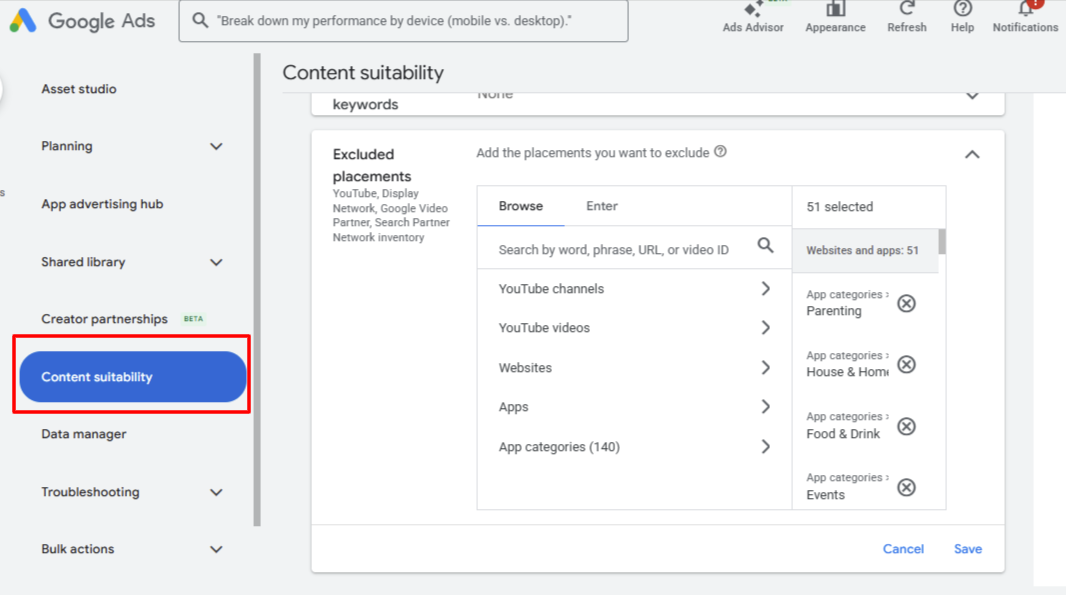
Performance Max (PMax) is often sold as a “set it and forget it” solution.In reality, most advertisers lose money with PMax not because the algorithm is bad — but because they launch it without controlling where their ads appear. If you’re running Performance Max for lead generation (dental, medical, legal, local services, or high-ticket offers), content quality matters just as much as bidding strategy. Before blaming bidding, assets, or Google itself, audit your Content Suitability settings. These account-level controls are one of the few direct ways to influence placement quality in PMax and they often deliver the quickest wins. Why PMax Defaults to Wasted Spend in Lead Gen Out of the box, PMax pulls inventory from: YouTube (videos, Shorts, channels) Display Network (websites, partner sites) Discovery feeds Gmail Mobile apps (games, casual, lifestyle) Search Partners Google’s AI loves cheap, high-volume placements think gaming apps, kids’ content, meme channels, food blogs, or event apps. These deliver fast impressions and low-cost clicks, inflating metrics while tanking lead quality. Common symptoms advertisers report: CPA looks “good” at first but leads are 60–80% unqualified (wrong intent, fake submissions, no-show appointments). Sales teams complain about “junk leads” eating follow-up time. High impression volume but conversion rates under 1–2% on forms/calls. Budget exhaustion on mobile apps (often 30–50%+ of spend in unchecked accounts). This isn’t a Smart Bidding issue, it’s a placement hygiene issue. What Content Suitability Really Controls (and Why It Matters for PMax) Content Suitability (under Tools & Settings > Shared library > Content suitability) applies account-wide, including to all PMax campaigns. It lets you: Block entire app categories or specific apps. Exclude specific YouTube channels/videos. Restrict websites/apps with low relevance or brand risk. Set inventory filters (Standard/Limited/Expanded). It’s not perfect exclusions don’t cover everything (e.g., limited impact on some Shorts or auto-generated content), and overdoing them can shrink the AI’s optimization pool. But when used smartly, it shifts budget toward higher-intent environments like relevant YouTube videos or quality Display sites. Step 1: Aggressively Exclude Mobile App Categories Mobile apps are the #1 culprit for wasted spend in lead-gen PMax accidental clicks from games/entertainment, bot traffic, zero purchase intent. Real advertiser feedback (from audits and forums): Many see 30–50%+ of early PMax spend in apps. Excluding categories like Games, Entertainment, Parenting, Food & Drink, Events, Lifestyle can drop ineffective impressions by 70–90%. Reported CPA reductions: 15–40% in lead-gen accounts (e.g., local services seeing better form quality after blocking casual apps). How to do it: Go to Content Suitability > App categories. Exclude broadly at first: Parenting, Food & Drink, Games (all sub-types), Entertainment, Events, House & Home, Lifestyle. (Start with 100–140 categories if your niche doesn’t overlap.) Save and monitor Placement reports for residual apps — add specifics manually. Tip: Don’t exclude all apps if your offer is app-related; test in phases. Step 2: Hunt and Exclude Irrelevant YouTube Channels PMax hides most placement details, but Content Suitability reveals YouTube channels/videos where ads ran. Common low-performers: Kids/family channels (brand risk for adult services). Meme, prank, entertainment-only, or low-engagement channels. Foreign-language or off-topic content (e.g., immigration/entertainment channels if unrelated). Process: Check Content Suitability > Excluded placements or run a Placement report (Reports > Predefined > Content suitability/Placements). Look for channels with high impressions/low conversions (e.g., “La Hora Del Inmigrante,” “LET the FUN,” casual meme channels). Add to exclusions (up to 65,000 allowed). Review weekly — new ones appear as the AI explores. Step 3: Target Low-Quality Websites & Refine Inventory Type PMax hits Made-for-Ads (MFA) sites, arbitrage pages, and irrelevant partners. Actions: Use Placement reports to spot and exclude poor sites (e.g., high-impression/zero-conversion domains). Set Inventory type: Standard (default good balance; excludes strong profanity/violence/sexual content) or Limited (stricter for sensitive niches like medical/legal — excludes moderate issues too). Avoid Expanded unless scaling brand awareness. Real talk: Exclusions help, but too many (e.g., 500+ sites) can limit scale aim for data-driven, not blanket. Step 4: Pair with Other Essentials (Content Suitability Alone Isn’t Magic) Content Suitability cleans the fuel, but you still need: Strong assets: 15+ headlines, high-quality images/videos (vertical for Shorts), “Excellent” strength. Audience signals: Customer lists, custom segments to guide AI. Bidding: Maximize Conversions or tCPA; value rules for high-quality leads. Tracking: Enhanced conversions, offline imports for real quality scoring. Negatives: Campaign-level negatives (now available) for junk terms. Realistic Timeline & Expected Results After solid exclusions: Days 1–7: Learning readjusts; possible temporary volume/CPA dip. Days 7–21: Spend shifts; CPA often stabilizes 15–30% lower, lead quality up (fewer junk forms). Days 21–60: Noticeable improvements — sales teams report 30–50% fewer unqualified leads, higher appointment rates, better close ratios. Many accounts see 20–40% CPA drop from app exclusions alone, but results vary by niche/competition. Final Reality Check Performance Max delivers strong lead-generation results when configured correctly. By excluding low-intent app traffic and irrelevant YouTube placements through Content Suitability, you steer the algorithm toward higher-quality inventory improving lead quality, brand safety, and ROI. When paired with strong creatives, accurate tracking, and value-based bidding, these controls typically drive measurable gains in cost efficiency within a few weeks. For campaigns focused on qualified leads over raw volume, Content Suitability isn’t optional it’s a best practice.
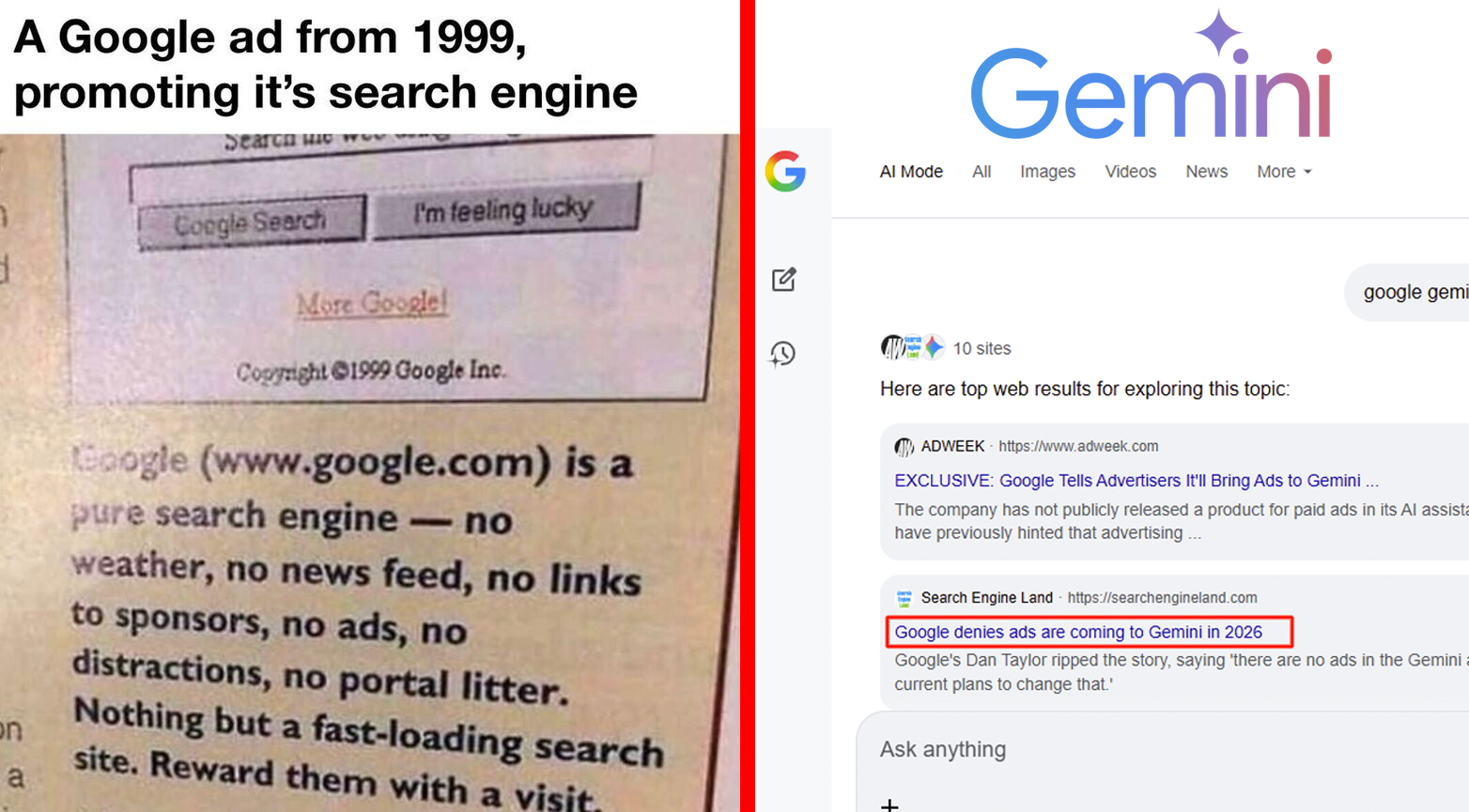
1999 Google: ‘No Ads, No Distractions’ – Gemini’s Mirror Moment
In the dawn of the internet age, Google launched with a refreshing promise: a clean, ad-free search experience. That famous 1999 ad proclaimed it a “pure search engine no ads, no distractions, no portal litter” just fast, relevant results that rewarded users with simplicity. This free, uncompromised approach captured hearts worldwide, building massive user trust and adoption. Fast forward, and the same company now generates hundreds of billions in annual revenue, largely through smart, user-friendly advertising. This transformation didn’t betray the original vision; it amplified it, turning a free tool into a sustainable powerhouse that funds endless innovation. Today, Google’s Gemini AI stands at a similar crossroads—starting free and pure, with the potential to evolve into a multi-billion-dollar revenue engine that benefits everyone. Google’s Classic Playbook: Start Free, Scale Smartly Google’s early no-ads stance was genius. It differentiated the company from cluttered competitors, driving explosive growth in users and loyalty. But as traffic soared, so did the need for resources servers, engineers, and constant improvements. In 2000, Google introduced AdWords: simple, relevant text ads that appeared only when they matched a user’s intent. These weren’t intrusive banners; they were helpful suggestions that felt like natural extensions of search. The results? A virtuous cycle: Users got even better, faster, more accurate results. Advertisers reached highly engaged audiences. Google reinvested billions into free products like Gmail, Maps, YouTube, and Android. What began as a free service ballooned into Alphabet’s core revenue driver over $200 billion annually in recent years while keeping core search free for billions. The key? Ads enhanced value without ruining the experience. This model proved that starting free builds the foundation, while thoughtful monetization unlocks massive scale and innovation. Gemini Today: Echoing 1999’s Pure, Free Promise As of January 2026, Gemini mirrors that early Google spirit. It’s ad-free in its core app experience, focused on delivering clean, powerful AI assistance whether creative brainstorming, problem solving, or everyday help. Google’s leadership, including VP Dan Taylor, has emphasized “there are no ads in the Gemini app and there are no current plans to change that.” This purity is winning users: the Gemini app boasts over 650 million monthly active users, with rapid growth fueled by its seamless, distraction-free interface. Just like early Google Search, this free access drives adoption across diverse users from students in Karachi exploring ideas to professionals worldwide streamlining work. By keeping Gemini uncluttered now, Google builds trust, gathers feedback, and refines the model, setting the stage for long-term dominance in the AI era. The Positive Evolution: Why Gemini’s Revenue Model Will Be a Win-Win History shows that free starts lead to billion-dollar successes when monetization is done right. Gemini’s path could follow suit, evolving from free purity to a sustainable powerhouse. Here’s why this progression is exciting and beneficial: Sustaining Free Access for Everyone AI is expensive massive compute power, data centers, and talent demand huge investments (Alphabet’s 2025-2026 Cap Ex runs in the tens of billions). A revenue model ensures the core Gemini experience stays free or low-cost, subsidizing access for billions. Premium tiers (like Gemini Advanced) and targeted, helpful integrations could fund this without compromising the base version. Fueling Faster Innovation Google’s ad revenue powered moonshots like self-driving tech and quantum computing. For Gemini, revenue could accelerate breakthroughs: better multimodal understanding (text + images + voice), real-time capabilities, or specialized tools for education, health, and creativity. Users in places like Pakistan would gain from faster updates and more powerful features, all while the core remains accessible. Creating Smarter, More Helpful Experiences When done thoughtfully like Google’s relevant search ads monetization adds value. Imagine contextual suggestions in Gemini: eco-friendly product ideas during planning queries or verified partnerships for advice. These feel useful, not salesy, enriching conversations while supporting the ecosystem. Free users benefit from an even stronger product, paid options offer ad-free depth, and partners connect meaningfully. A Balanced, Transparent Approach Google has learned from the past, prioritizing clear labeling, user controls, and ethical standards. Any future model for Gemini would likely follow suit perhaps optional modes or intent-based integrations ensuring trust remains intact. This isn’t about rushing ads; it’s about smart evolution that rewards the massive user base built on free access. The Bright Future: Gemini as the Next Billion-Dollar Chapter Google’s story isn’t one of selling out it’s one of smart growth. Starting free built an empire that now funds free tools for the world. Gemini, launched in that same spirit, is poised to repeat the magic. By beginning ad-free, it captures hearts and minds; by evolving with a positive revenue model, it secures the resources to become transformative on a global scale. In 2026 and beyond, expect Gemini to follow the proven path: free at its foundation, billion-dollar in impact. This isn’t compromise it’s the natural next step that keeps innovation flowing, access open, and experiences improving for users everywhere. Google’s legacy proves it: the best things start free… and the smartest ones grow to change the world even more.
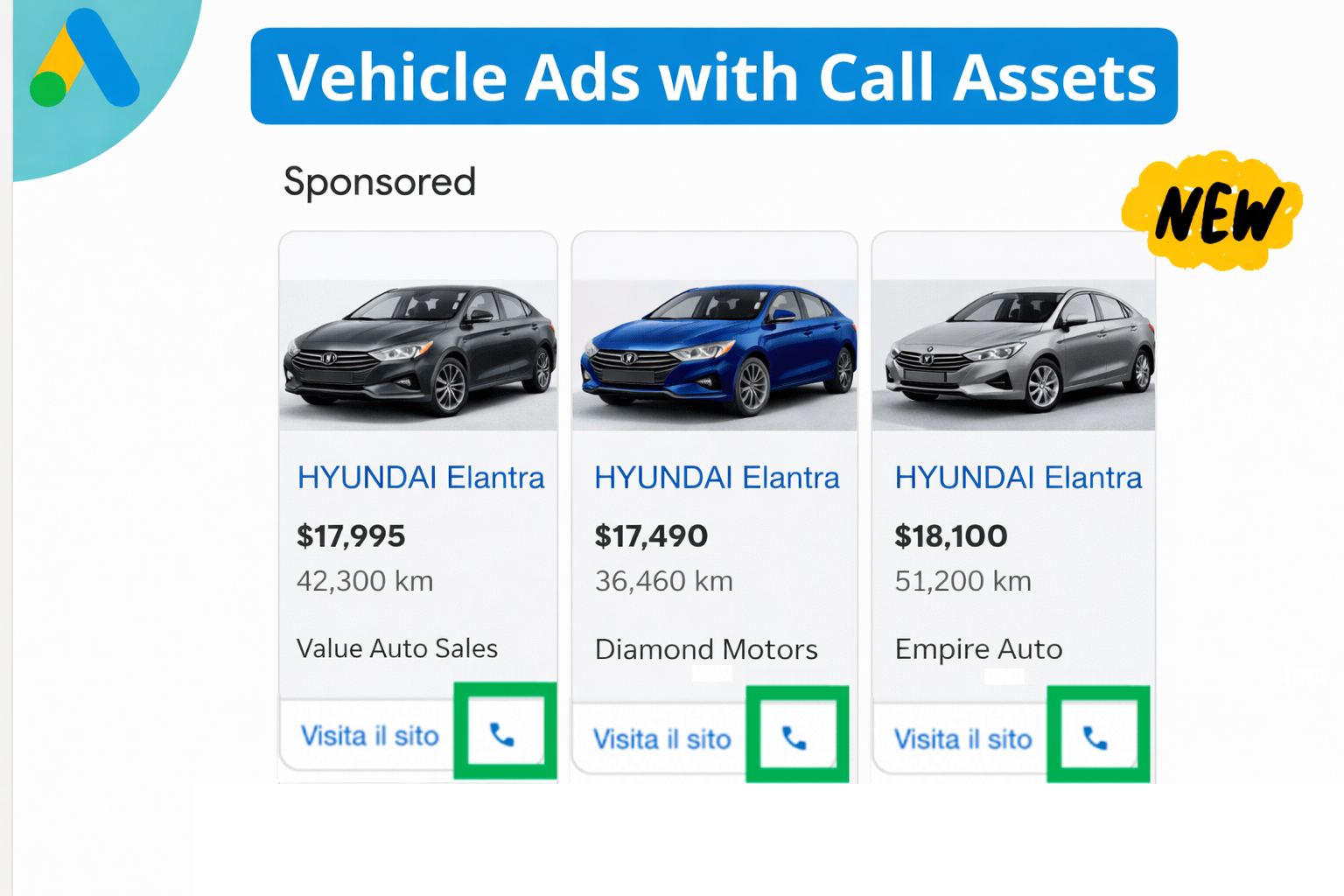
Vehicle Ads on Google Now Enable Direct Phone Calls
Google has rolled out an exciting update to Vehicle Ads, introducing Call Assets that enable direct click-to-call from the ad itself. This new feature allows car shoppers to connect with dealers instantly, bridging the gap between online browsing and real-time conversations. Spotted first by Google Ads expert Thomas Eccel on LinkedIn and reported by Search Engine Land on January 7, 2026, this upgrade marks a significant step forward in automotive digital advertising. What Are Vehicle Ads? Vehicle Ads (also known as Vehicle Listing Ads) are a specialized format in Google Ads designed specifically for automotive dealers. They showcase actual vehicle inventory including images, prices, mileage, make, model, and more directly in Google Search results. Powered by your vehicle feed data, these ads target high-intent shoppers searching for specific cars. Unlike traditional text ads, Vehicle Ads provide rich, visual listings that appear prominently on search pages, driving qualified traffic to dealership websites or landing pages. The New Call Upgrade: How It Works The latest enhancement integrates Call Assets into Vehicle Ads. Now, when a shopper views your vehicle listing in search results: A prominent call button appears alongside the ad details. Users can tap (on mobile) or click to initiate a phone call directly to the dealership. This creates a seamless, frictionless path from ad impression to live conversation. This feature is particularly powerful on mobile devices, where most car research happens today. Why This Matters for Dealers and Advertisers Car buyers are increasingly seeking immediacy. They want quick answers to questions like: Is this vehicle still available? Can I schedule a test drive? What’s the best price or financing option? Forms and website visits are great, but nothing beats a real-time phone conversation for building trust and closing deals faster. Key benefits include: Reduced friction: High-intent shoppers can engage immediately without navigating to a site or filling out a lead form. Higher conversion potential: Phone calls often convert at higher rates than digital leads, especially in high-value purchases like vehicles. Competitive edge: Dealers optimized for calls (with proper staffing and training) will capture more leads, while others risk falling behind. Shift in responsibility: With calls becoming a direct ad conversion point, dealerships must prioritize call handling quality, response times, and tracking. This update aligns with broader trends in Google Ads, where features like call assets are replacing older call-only ads to provide more flexible, AI-optimized experiences. What Should Dealers Do Next? Check your campaigns → Log into Google Ads and review your Vehicle Ads setups (typically in Performance Max campaigns). Add Call Assets → Ensure call information is enabled and accurate. Optimize for calls → Train staff on handling inbound ad calls, use call tracking tools, and monitor performance metrics. Test and iterate → Monitor how the new feature impacts your lead volume and quality. This upgrade reinforces Vehicle Ads as one of the most effective tools for automotive marketers. By combining rich inventory visuals with instant connectivity, Google is making it easier than ever to turn searches into sales. Stay ahead in 2026 by embracing these changes — the future of car shopping is faster and more direct than ever. Source: Based on reporting from Search Engine Land (January 7, 2026) and observations shared by industry experts. If you’re running Vehicle Ads, this is a must-implement update! What are your thoughts on how calls will impact automotive PPC performance? Share in the comments.
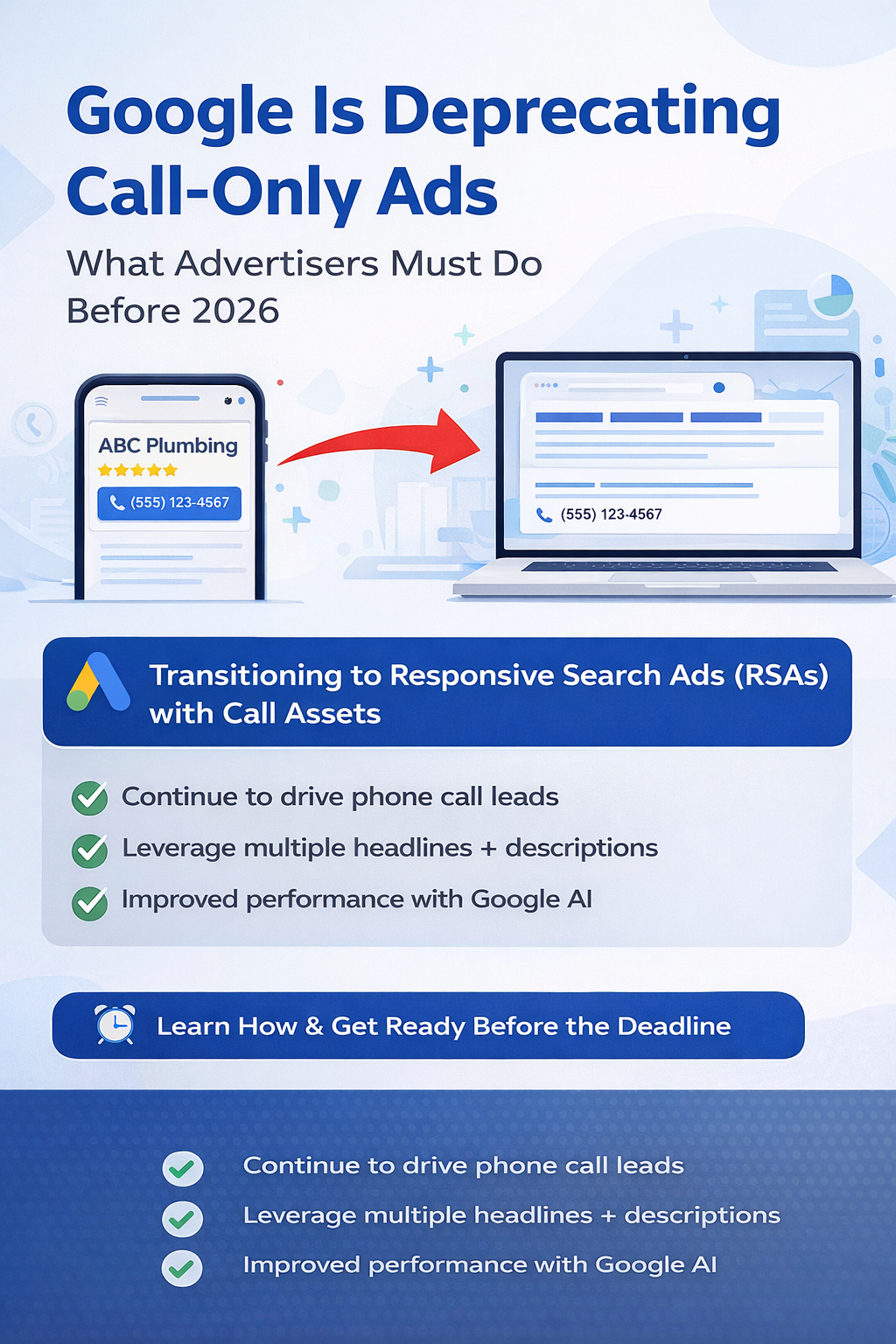
Call-Only Ads Are Ending: What Advertisers Must Do Before 2026
Google Ads is officially phasing out Call-Only Ads (also known as call ads), forcing advertisers who depend on phone call leads to migrate now to prevent any disruption in lead generation. To keep driving valuable phone calls, Google is shifting all advertisers to Responsive Search Ads (RSAs) enhanced with Call Assets, an AI-powered, more efficient way to run call-focused campaigns. This change is mandatory and represents a significant evolution in phone lead advertising on Google. What’s Changing? Google is fully replacing Call-Only Ads with Responsive Search Ads that include Call Assets. Here’s a quick comparison: Old: Call-Only Ads These ads appeared only on mobile devices capable of making calls, featuring a prominent phone number and “Call” button. They drove direct calls but no website visits (unless a URL was added). New: RSAs with Call Assets Advertisers will use flexible Responsive Search Ads, attaching Call Assets to display a clickable phone number and “Call” button alongside dynamic headlines and descriptions. RSAs use Google AI to test and optimize combinations of headlines and descriptions, matching ads better to user searches. When combined with call assets, they deliver high-quality phone leads, often outperforming the old format. Key Dates You Must Know February 2026: No new Call-Only Ads can be created. February 2027: All existing Call-Only Ads will stop serving impressions completely. Warning: Delaying the switch risks sudden drops in call volume, lower visibility, and a last-minute scramble. Why Google Is Making This Change Google is prioritizing: AI-optimized performance Improved user experience Greater ad flexibility RSAs with call assets allow Google to: Deliver the most relevant message based on query, device, and intent Support both calls and website clicks from one ad Scale better across broader search terms This aligns with Google’s broader move toward AI-driven, unified ad formats. Benefits of RSAs with Call Assets Maintain (or increase) phone call volume AI-driven relevance and automatic optimization Broader reach across more search queries Single ad format for dual goals (calls + site visits) Deeper performance data and easier testing For local/service businesses like plumbers, lawyers, clinics, or dentists, this upgrade helps sustain strong call leads using modern, future-proof tools. How to Transition: Step-by-Step Guide Create or Update a Responsive Search Ad (RSA) Provide multiple headlines (up to 15) and descriptions (up to 5). Include services, offers, and trust signals. Add Call Assets In the Assets section, select “Call” and enter your phone number. Enable call reporting and set schedules (e.g., business hours only). Apply Call Assets to Campaigns Target high-intent or local search campaigns where calls matter most. Phase Out Call-Only Ads Once new RSAs perform well, pause or remove old Call-Only Ads to shift traffic smoothly. Monitor and Optimize Track calls as conversions (e.g., duration >30-60 seconds), review performance reports, and refine assets. Best Practices for Call-Focused RSAs Use call-oriented headlines: “Call Now for a Quote,” “Speak to an Expert Today,” “Book Appointment by Phone” Schedule call assets to show only during open hours Ensure landing pages are mobile-friendly (even if calls are primary) Set up proper call conversion tracking Pin key headlines/descriptions if needed for consistency Final Thoughts Deprecating Call-Only Ads isn’t the end of phone leads, it’s an upgrade to a smarter, more effective system powered by AI. Early adopters will: Preserve call volume seamlessly Gain from better optimization Outpace competitors who wait Act now in early 2026 to test, refine, and future-proof your campaigns. If you’re unsure, consult a Google Ads expert for a smooth migration. Sources: Official Google Ads Help documentation (updated October 2025) and industry reports from Search Engine Land, PPC Land, and others.
My Hands-On Review: Ads in Google’s AI Mode – What I Found in Early 2026
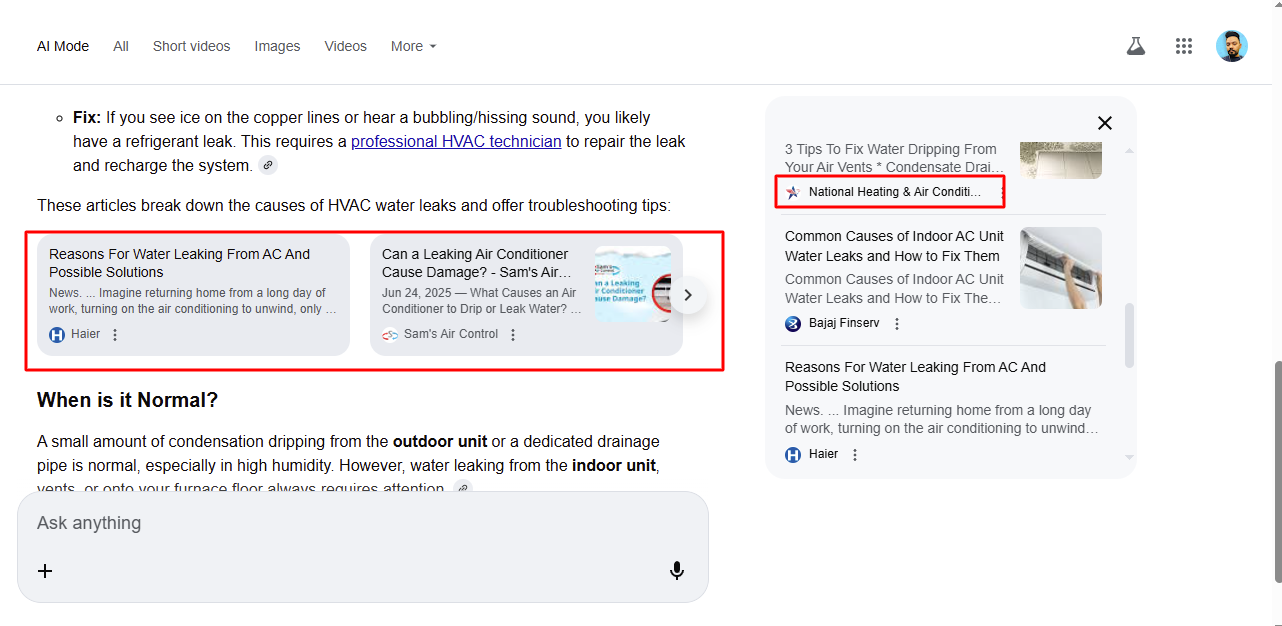
Over the past few weeks, I’ve been diving deep into Google’s AI search features, triggered by the November 25, 2025 report on PPC News Feed: “Ads Now Appearing in Google AI Mode Results”. That article highlighted the first sightings of paid Google Ads inside AI Mode (the Gemini-powered conversational search interface), shared by experts like Greg Sterling, Brodie Clark, and Barry Schwartz. Early examples were on local queries like HVAC repair, with sponsored placements integrated into or below the AI response. I’ve gone through extensive testing across various queries to see how this is playing out now, in January 2026. Here’s my personal review and findings. The Current Status: Ads Exist, But Limited and Targeted Yes, ads are appearing in AI Mode — but only in specific cases. They are always clearly labeled “Sponsored” (Google maintains strict transparency). Placement: Typically at the bottom or contextually integrated, often as local service cards. Primarily on high-commercial intent, local queries (e.g., “HVAC repair near me,” “emergency plumber”). This matches the initial November 2025 sightings. Where I Didn’t See Ads On informational or troubleshooting queries like “water leaking from HVAC” or “why is my AC dripping water”: AI Mode shows detailed responses with organic link cards only (e.g., articles from Haier, Sam’s Air Control, Bajaj Finserv, or similar helpful sources). No “Sponsored” sections at all just earned visibility from strong SEO and content. Standard Google Search results (outside AI Mode) behave as usual: prominent YouTube videos, Reddit threads, and blogs ranking organically for how-to queries. Why the Difference? Google prioritizes user experience: Informational queries → Focus on helpful, ad-free organic content (videos, forums, blogs). Commercial/local queries → Opportunity for relevant sponsored suggestions. As of early 2026, ads in AI Mode remain in testing/gradual rollout in the US (per Google’s official statements from late 2025). Not every user or query triggers them yet. Implications for PPC and SEO Professionals For Advertisers: New high-intent inventory is emerging in conversational AI. Eligible via existing Search, Performance Max, or Local campaigns — no special setup needed. Potential for rising CPCs as competition grows, but great for capturing deeper research moments. For SEO: Organic rankings still dominate informational queries in AI Mode. Getting featured in those link cards (via quality content) drives massive trust and traffic — for free. My Takeaway After Testing The shift is real but measured. Ads in AI Mode are here (starting from those November 2025 sightings), but far from overwhelming. Google is balancing monetization with usefulness sponsored only where it makes sense. Local service businesses should closely track these placements. For all others, great content still wins premium space in AI results. Have you spotted sponsored ads in AI Mode yet? What queries triggered them for you? Share in the comments let’s compare notes as this evolves! Sources: PPC News Feed (Nov 25, 2025), Google Ads Help documentation, Search Engine Land, direct testing in AI Mode (Jan 2026). #GoogleAds #AIMode #PPC #SEO #DigitalMarketing #AIinSearch #2026Trends
Google’s New AI Mode – How I Look at Marketing
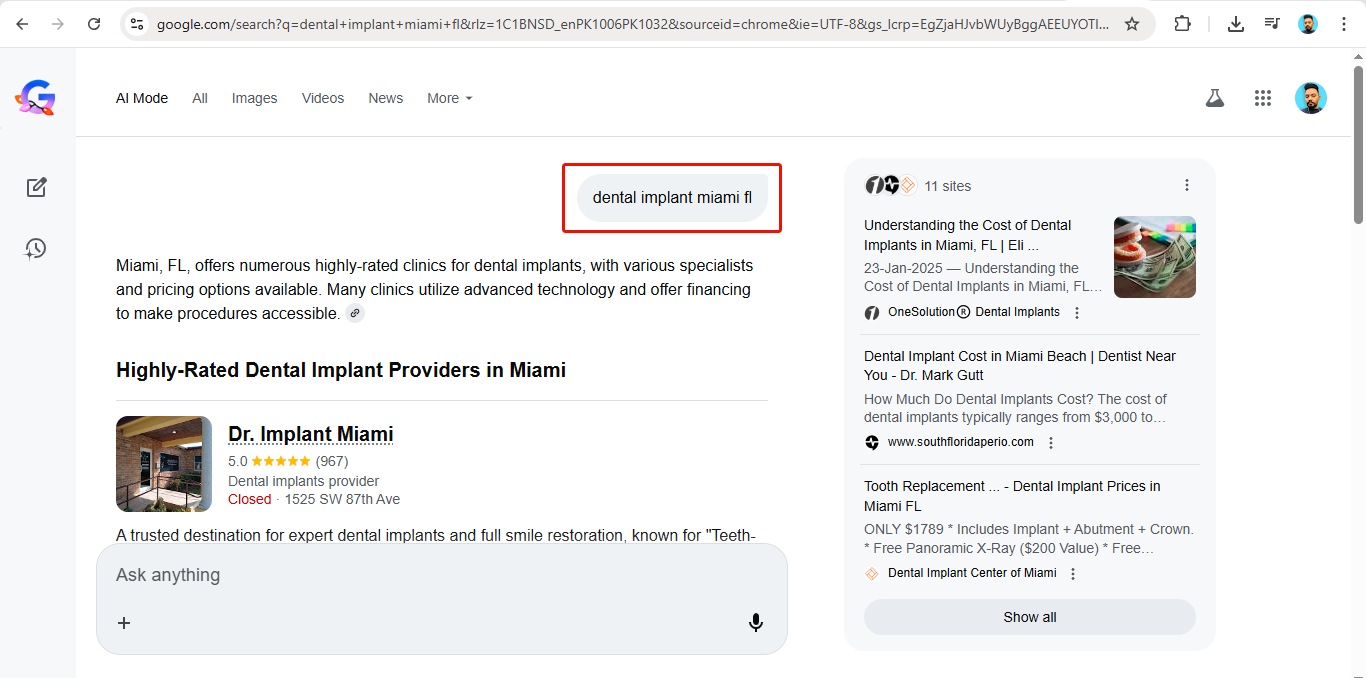
I recently spent time testing Google’s new AI-powered search mode, and it genuinely changed how I think about the future of digital marketing. This isn’t just an update to search.It’s a fundamental shift in how information is discovered. Google’s AI now performs multiple searches at once, understands context, and interprets user intent at a far deeper level than traditional keyword-based systems. It doesn’t just look at what users type — it looks at why they’re searching, what they like, what they avoid, and what will actually help them make a decision. And because of this, marketing is evolving rapidly — not only in terms of technology, but in how platforms understand human behavior. The biggest misconception I’m seeing right now There’s a growing narrative that: AI should be treated like a “god” Paid advertising is somehow “wrong” or unnecessary in an AI-driven world Organic-only visibility will replace structured marketing I strongly disagree. AI is not here to eliminate businesses.AI is not here to punish advertisers. AI is here to improve the experience for the end user — and at the same time, help relevant businesses show up in more meaningful ways. What’s really changing is how visibility is earned In an AI-powered search environment: Relevance matters more than repetitionShowing up often doesn’t matter if you’re not useful. User intent matters more than aggressive promotionHard selling loses value. Helping wins. Helpful presence matters more than disruptive adsAI filters noise. It amplifies value. This doesn’t mean paid ads are dying. It means bad ads are. Paid advertising is not becoming irrelevant — poorly targeted, low-quality, intent-blind advertising is. What businesses still need — even in AI Mode Even with AI-driven search, businesses still require: Clear visibility at the right moments Strong trust signals (reviews, authority, credibility) Strategic placement, not random exposure A deep understanding of their audience’s needs and behavior The difference now is that marketing must be: Smarter More contextual More user-focused More aligned with real intent The real shift for marketers AI doesn’t replace marketing.It raises the standard of marketing. The future belongs to those who can: Combine AI insights with human strategy Balance organic presence with structured paid campaigns Focus on solving problems, not just selling solutions Marketing has never been about tricking algorithms.It’s always been about understanding people. AI is simply forcing us to do that better. Marketing isn’t ending.It’s evolving — and that’s a good thing. Those who adapt will continue to grow.